What is an e-invoice?
Since 1 January 2025, an electronic invoice is defined as an invoice that can be issued, transmitted, received and processed in a structured electronic format.
This is based on the EU standard EN 16931, published on 28 June 2017, and the E-Invoicing Regulation (ERechV).
The following formats apply in Germany, all of which meet the criteria of the EN 16931 standard and the ERechV:
- XRechnung: a purely machine-readable XML invoice
- ZUGFeRD: a hybrid format that combines a human-readable PDF file with an embedded XML structure
- Other structured formats, such as EDI, are also permitted, provided they supply fully extractable data records in accordance with the German Value Added Tax Act (UStG).
Never miss another update
Statutory time limits: What applies today
Depending on the type of business and the company’s turnover, the following deadlines apply for the transition to e-invoicing:
- From 1 January 2027, domestic German companies must exchange their invoices in the electronic format specified above.
- Companies with a turnover of less than EUR 800,000 in the previous year may take advantage of the extended deadline for implementation until 31 December 2027.
- From 1 January 2028, the use of e-invoicing will be mandatory for all companies in B2B transactions.
- In B2G transactions, e-invoicing has been mandatory since 2020.
SAP DOCUMENT AND REPORTING COMPLIANCE (DRC)
“The Document and Reporting Compliance functions enable you to create, process and monitor electronic documents and statutory reports. This ensures that your organisation complies with local legal requirements.” (SAP)
The SAP DRC solution is compatible with various SAP versions:
SAP ECC
SAP S/4HANA
SAP S/4HANA Cloud
In all versions, SAP DRC is a cloud service and is therefore integrated via the Business AI Platform (BAIP).

The solution supports both the direct B2B exchange of incoming and outgoing invoices and their submission to tax authorities. SAP DRC complies with the legal e-invoicing requirements of a wide range of countries worldwide.
Peppol offers a further option for exchanging invoices electronically.


Thanks to CONSILIO, we were able to establish a globally standardized controlling framework at our largest European locations and successfully harmonize our CO processes and master data.
Peppol
Peppol stands for Pan-European Public Procurement Online.
Peppol is a network established by a non-profit organisation. Its aim is to facilitate the cross-border processing of procurement procedures electronically, in a standardised and automated manner. Part of this involves the transmission of electronic invoices.
Peppol is currently the only transmission channel that enables automated machine-to-machine (M2M) communication and the bulk export of e-invoices.
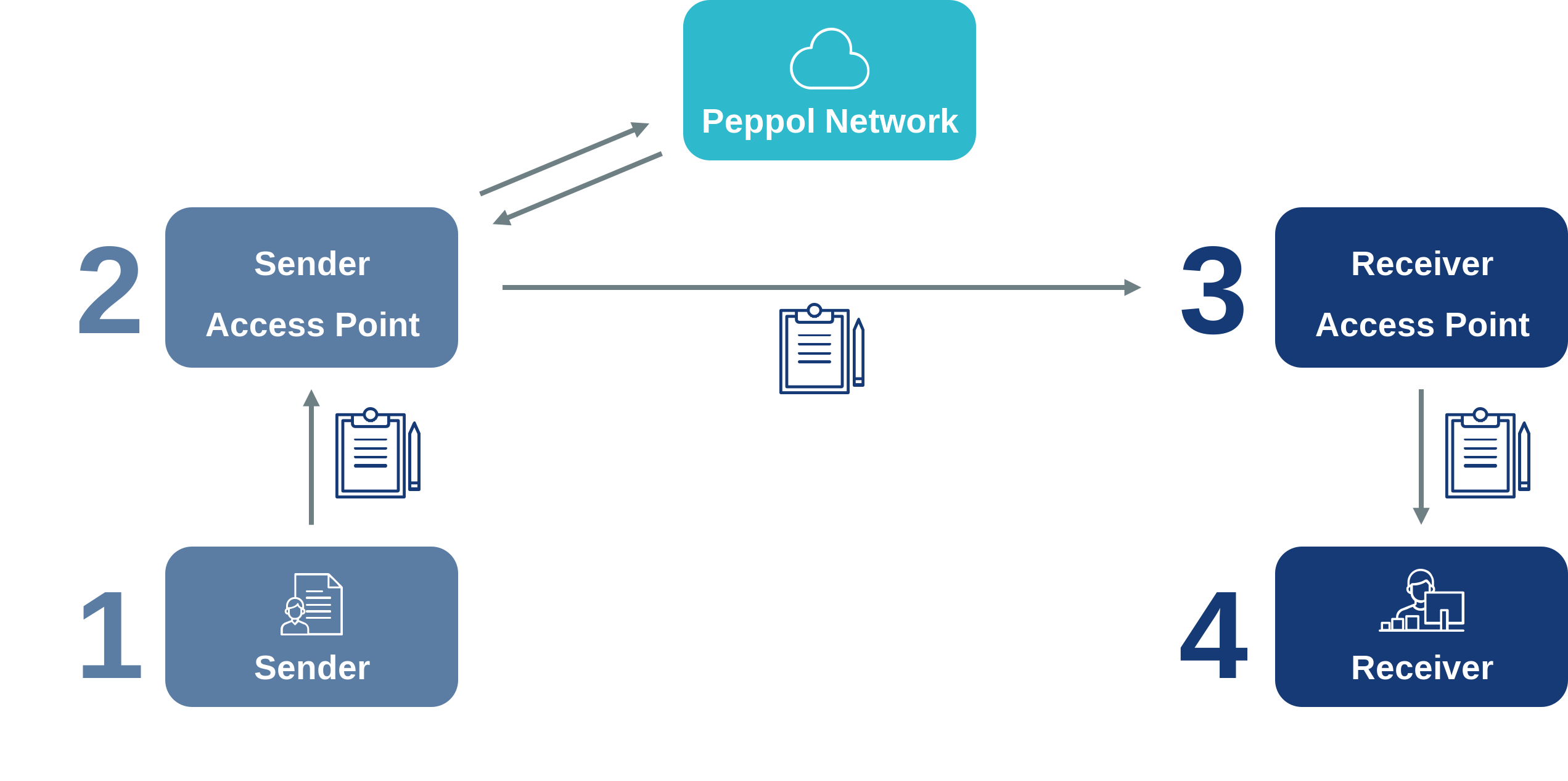
Peppol uses what is known as the ‘four-corner model’:
This means that the sender and recipient of the e-invoice must be registered on the Peppol network. They are assigned to what are known as ‘sender or recipient access points’. The use of these access points, together with the identification of the sending and receiving partners that takes place via them, ensures that the documents (e-invoices) are delivered correctly. Furthermore, the access points report the status of message delivery back to the sender.
Statutory Reporting & Dashboards
As well as meeting the legal requirements for e-invoicing, the SAP DRC also offers a wide range of solutions for statutory reporting worldwide.
In both cases, the SAP DRC utilises monitoring cockpits.
An insight into the e-Document Cockpit for monitoring e-invoices:

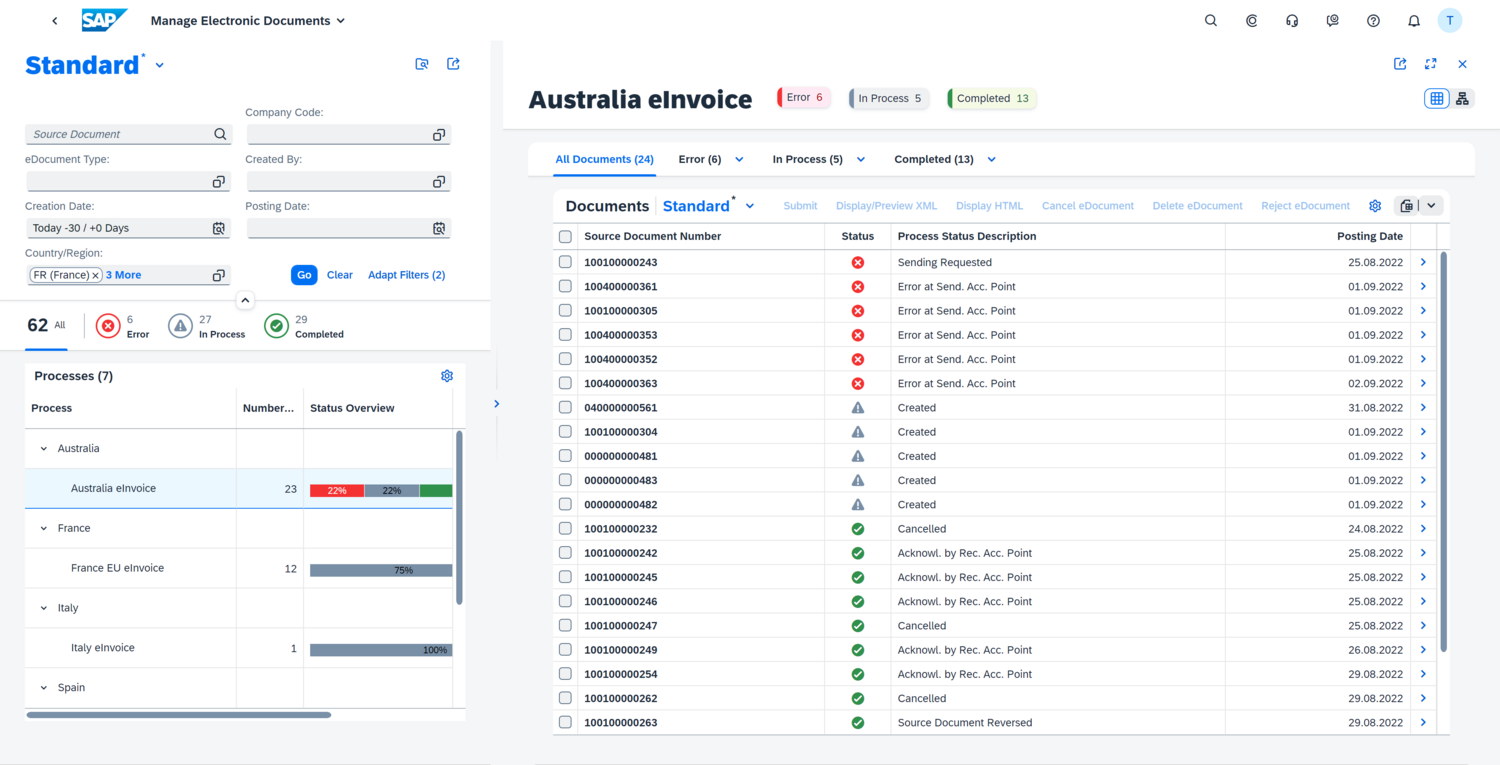
The layout of the Cockpit is relatively similar in both the SAP GUI and the SAP Fiori Launchpad: on the left-hand side, you can see an overview of the configured countries and solutions. From there, you can navigate to the details in the right-hand section of the Cockpit.
The details section contains a list of all e-documents created during the selected period. From within the cockpit, you can, amongst other things, send e-documents manually, view the XML structure, navigate to the source document, view transmission notes and check the e-document status.
As well as sending e-documents manually, it is also possible to send them automatically.

E-invoicing is more than just a legal requirement: with SAP DRC and Peppol, businesses can exchange invoices in a legally compliant, automated and future-proof manner.
Master data and processes
SAP DRC does not directly interfere with your existing end-to-end processes.
Nevertheless, depending on the transmission method of the e-invoice, for example, email addresses must be stored correctly and in accordance with SAP DRC in the business partner data.
Before implementing SAP DRC, it is first necessary to define various mappings so that the information generated from SAP ERP can be processed in a standardised manner. Tax codes and payment methods, for example, are among the mappings that need to be defined.
You can also decide on a customer-specific basis which transmission method should be used to send the e-invoice.
Always up to date
As the SAP DRC is a cloud service, you can be assured that any changes to legal requirements will be implemented by SAP in a timely manner. Depending on your system version, these will be made available to you with the next release update or through the installation of SAP Notes.