The migration of legacy data to the future SAP S/4HANA landscape is always a central issue in SAP transformations or implementations. Structured and secure data migration is essential, particularly with regard to proper accounting, auditing, and compliance considerations. For transformations using the greenfield approach, as well as for mergers or the integration of additional companies into existing SAP systems, SAP offers its own tool for performing data migration: the Data Migration Cockpit. In this blog, we take a closer look at how data migration can be carried out with the SAP Data Migration Cockpit, what exactly the Data Migration Cockpit is, what advantages the Cockpit offers during migration, and what a typical process with the Data Migration Cockpit looks like.

What is the SAP Data Migration Cockpit?
The SAP Data Migration Cockpit is a tool integrated into SAP S/4HANA that supports the structured and standardized migration of master and transaction data from SAP and third-party systems to an SAP S/4HANA system. SAP provides predefined migration objects for this purpose, such as material master, vendors/customers (business partners), or assets (including balances), which are based on the standard data objects of the SAP system. The use of these predefined objects significantly standardizes and simplifies the entire migration process. Two approaches are available within the cockpit: staging tables and direct transfer. The approach to be used must be decided based on the initial situation.
Staging tables
With this approach, an XML template is uploaded to the Data Migration Cockpit, where it is available as a template and can be downloaded before being filled in manually. This template contains all the necessary fields and spreadsheets in accordance with the SAP structures. Once filled in, the XML file is uploaded and the data can be migrated.
Direct Transfer
With direct transfer, there is no XML file; instead, the cockpit is connected directly to an SAP source system. The data to be migrated can be selected within the cockpit. The data can then be mapped and migrated to the target system.
The migration approach used depends on the volume of data records, the system landscape, and the data requirements.

Advantages of the SAP Data Migration Cockpit
The SAP Data Migration Cockpit offers several key advantages over third-party tools:
1. Predefined migration objects
SAP provides standardized templates, including field descriptions and validation logic, for many data objects (e.g., material master, vendors/customers (business partners), G/L accounts). This enables a structured and clean migration to the target system.

2. Transparent migration process
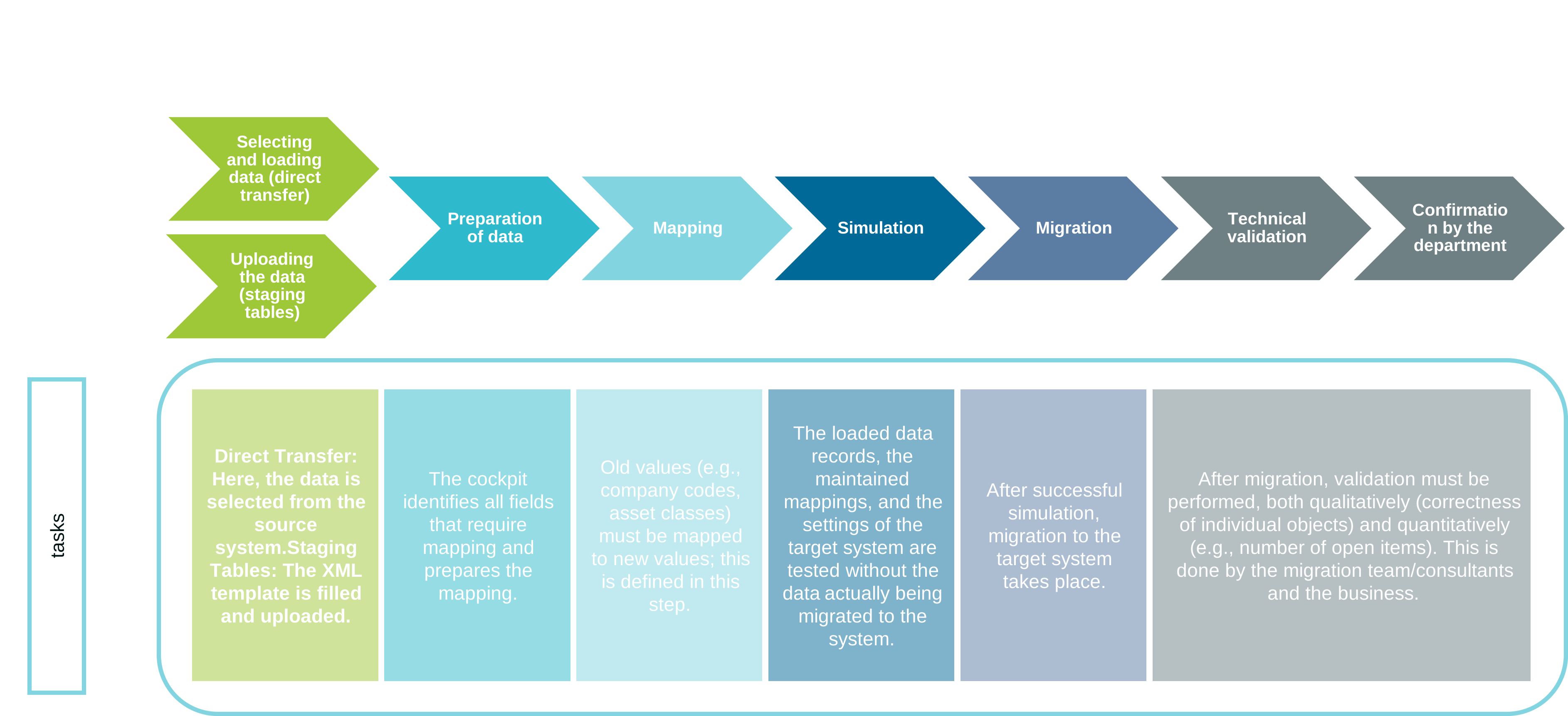
The migration process is clearly defined: load data -> prepare/map -> simulate -> migrate. This standard process is particularly important for audits, as all steps are traceable. Error logs are stored and can also be viewed after migration.
3. No programming required
Since this is a standard SAP tool, no programming knowledge is required. It is user-friendly and data can be accessed via XML files or direct system access.
4. Integrated validation mechanisms
Before the actual migration, a simulation run is performed to ensure data quality. Errors can be detected and corrected at this stage before data is migrated to the target system. Unlike many competing tools, this is not a purely technical database migration, but a business-oriented, booking-oriented migration. For example, the Data Migration Cockpit checks and validates the account settings of the G/L accounts or relevant settings in the material master. If the settings of the G/L account or the supplier/customer (business partner) do not correspond to the transaction, the simulation runs into errors.

5. S/4HANA Integration
The cockpit is fully integrated into SAP S/4HANA (cloud and on-premise). This allows SAP customizing settings and validations to be included directly in the migration for a particularly system-oriented and quality-assured migration.
Data migration process
The exact procedure depends on the chosen approach:
Upload file (only staging)
The XML template is filled in and uploaded. During the upload process, SAP checks for structural consistency, e.g., whether all relevant table sheets are filled in or whether all mandatory fields contain values. The template can be downloaded in the previous step and then filled in.

Selecting & loading data (Direct Transfer only)
Here, you select the data from the source system (e.g., by company code). A detailed selection is only possible using transaction LTMOM. After selection, the data is loaded into the cockpit.
Preparation of data
Both approaches (direct transfer and staging tables) now come together: The cockpit identifies all fields that require mapping and prepares the mapping technically.

Mapping
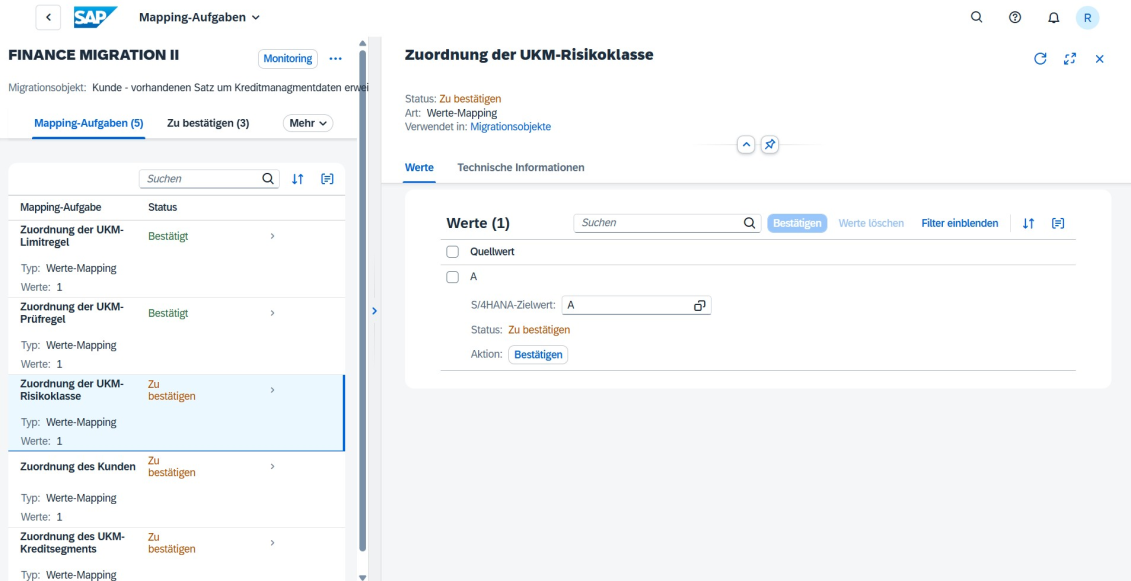
Old values (e.g., company codes, asset classes) must be mapped to new values. The cockpit automatically recognizes which fields require mapping. With the staging approach, new values can already be maintained in XML or in the cockpit; with direct transfer, mapping only takes place in the cockpit. Customer-specific mappings can be set up using transaction LTMOM if an extension of the mapping is required.
Simulation
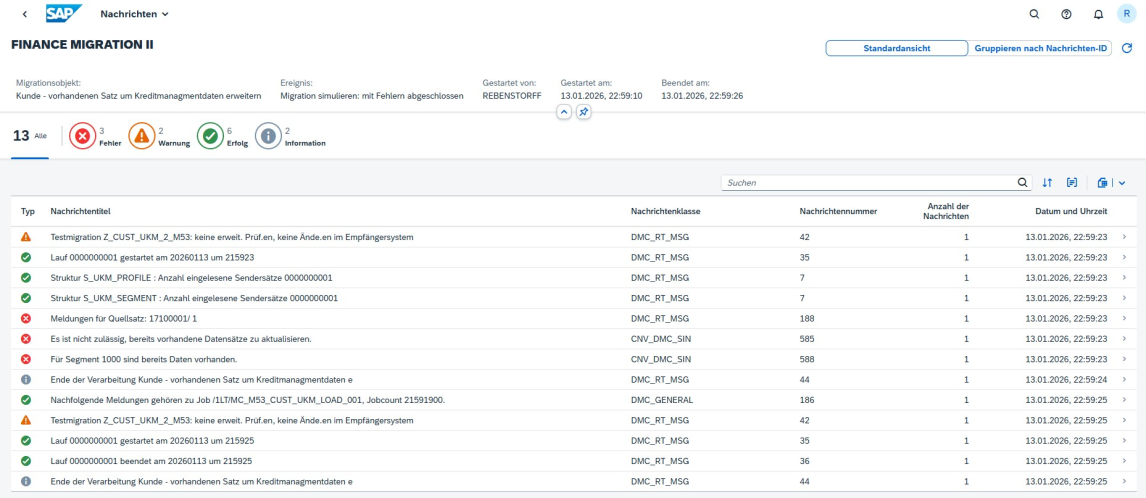
One of the most important steps in migration is simulation. In this step, the migration is simulated: the loaded data records, the maintained mappings, and the settings of the target system are tested without actually migrating the data to the system. The simulation can be repeated as often as desired, e.g., when an error message has been corrected, to check whether the solution was successful. A proven approach is to run the first simulation with only about 10% of the data records. The reason for this is that serious errors can be detected and corrected at an early stage, such as the migration period not being open, the migration contra account being locked, or basic mappings being missing. At the same time, this prevents the simulation run from taking up unnecessary time. Only when the simulation has been successful for all data records should the data records be migrated to the target system.
Migration
After successful simulation, migration to the target system takes place. Any errors can still be identified and processed via the log.
Spot Checks / Validation
After migration, validation must be performed both qualitatively (correctness of individual objects) and quantitatively (e.g., number of migrated suppliers and customers (business partners), material masters, or open items). Qualitative validation also includes checking individual values, e.g., the acquisition and production costs of assets or the VAT identification numbers of suppliers and customers (business partners). In finance, for example, it makes sense to validate the migration accounts with the values posted in the balance sheet. Ideally, these should match. A comparison with the balance sheet in the source system is also possible. The check should also be carried out at the line item level and not just at the summary level. Spot checks should generally be carried out by the migration team or the consultant, and detailed validation by the respective department.
Confirmation by the department
Finally, the department confirms the successful migration in writing. This should document which data was checked and what the result was. This confirmation also serves as relevant supporting documentation for a later audit.

The SAP Data Migration Cockpit is a suitable tool for migrating data from a third-party or SAP system to SAP S/4HANA. Thorough planning and preparation remain essential for a successful migration.
Summary
The SAP Data Migration Cockpit is a powerful tool for the structured migration of data to an SAP S/4HANA system. It combines standardization, transparency, and quality assurance without requiring complex programming. Nevertheless, successful migration remains a complex process that requires careful planning and intensive coordination between IT, business departments, and external consultants.