


SAP S/4HANA Embedded Analytics
Make informed decisions without detours using integrated reporting capabilities in SAP S/4HANA.
The new reporting capabilities in S/4HANA
In traditional ERP environments, companies typically have only limited options to quickly adapt reports or to perform aggregations and sorting in financial reports in a fast and straightforward way. In classic SAP BW environments, reporting can already be designed more flexibly; however, users still need to wait until data is loaded from the ERP system.
As a result, the data is never fully up to date. With S/4HANA Embedded Analytics, this limitation is now a thing of the past: transactional data can be analyzed immediately and without delay – in real time and on the fly – and used directly in reports. In addition, SAP provides new tools and Fiori apps that can be used across a wide range of devices.
- No Business Warehouse transfer to evaluate operative data
- Real time analysis of the booked data in the ERP system is possible at any time
- Use of pivot table functionalities for operational data
- Simple Excel exports
- Excellent integration into the SAP Fiori Launchpad
- Multidimensional reporting
- Extended functionalities for key users
- Extensive configuration options for end users




Example use cases of SAP S/4HANA Embedded Analytics
Production & Manufacturing: Keeping production KPIs in view at all times
With SAP S/4HANA Embedded Analytics, planners can analyze key figures such as capacity utilization, lead times, or scrap rates in real time - directly based on production data within the ERP system. Visualization via Fiori tiles on tablets or PCs enables proactive action when deviations occur in the production process.
Controlling: Making well-informed decisions faster
With Embedded Analytics, controllers gain access to up-to-date transactional data without having to wait for prepared data from the Business Warehouse. This enables daily, up-to-date analyses of cost centers, budget variances, investments, or production costs - directly within self-service reports or custom dashboards. Simulation-based comparisons can also be implemented more easily, for example in monthly or quarterly reporting.
Learn more about Embedded Analytics in Finance & Controlling
Sales: Transparent sales processes from pipeline to order fulfillment
With Embedded Analytics in Sales, sales managers gain a 360-degree view of all sales processes. The Fiori app “My Sales Overview” provides clear dashboards covering order volumes, open quotations, delivery status, and backorders.
Sales managers and field sales teams can flexibly analyze KPIs such as revenue development, customer orders, order status, or margin trends - even on the go using tablets or smartphones.



Our customers:
![[Translate to English:] BMW](/fileadmin/_logos/_kunden/logo-bmw-2020.svg)





Of course, we support you in setting up your embedded analytics solution by jointly identifying relevant functionalities, creating customized data models, and generating informative views. In the end, you should not only be able to operate the solution but also fully leverage its capabilities. That’s why we complement our services with comprehensive training sessions for end users.
Classic ABAP Reporting vs. Embedded Analytics – the evolution of reporting
With SAP S/4HANA Embedded Analytics, reporting in Finance & Controlling is evolving from static lists to integrated real-time analytics directly within the ERP system. While classic ABAP reports are typically based on fixed programs and manual adjustments, Embedded Analytics enables flexible, visually enriched analyses based on up-to-date live data – without system switching and without delays.
| Criterion | Classic ABAP Reporting | SAP S/4HANA Embedded Analytics |
| Technology | Custom-developed ABAP programs | CDS views within the S/4HANA data model |
| Data basis | Aggregated data, often batch-based | Live real-time data directly from the ERP |
| Flexibility | Changes only possible through IT adjustments | Self-service analytics via Fiori apps |
| Visualization | Table-based, limited graphical visualization | Interactive dashboards and charts |
| Target audience | Business departments with IT support | End users and decision-makers |
| Maintenance effort | High – custom developments | Low – preconfigured content and models |
| Performance / Speed | Report creation often delayed | Instant real-time insights |
SAP S/4HANA Embedded Analytics vs. SAP Analytics Cloud
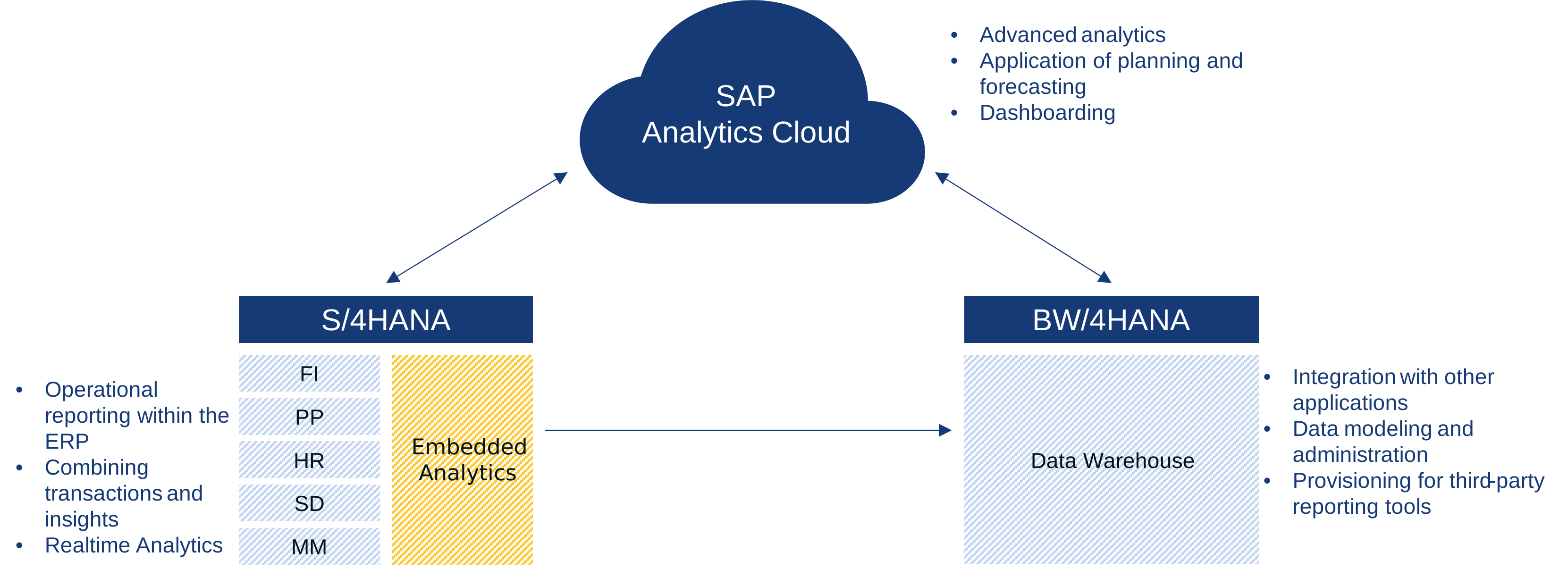
SAP S/4HANA Embedded Analytics and SAP Analytics Cloud (SAC) complement each other as two layers of data analytics within the SAP ecosystem. Embedded Analytics is directly integrated into the S/4HANA system and enables real-time operational reporting at the point where data is created. This allows users to perform transactions and analytics in a single step and respond immediately to current business events. SAP Analytics Cloud extends these capabilities with strategic and planning-oriented analytics. It connects data from multiple systems, provides forecasting, simulation, and planning functions, and presents results in interactive dashboards and stories
The Virtual Data Model
The Virtual Data Model is a structured representation of the HANA database that underlies all S/4HANA systems. Data from different tables is linked and made available with the help of Core Data Services.
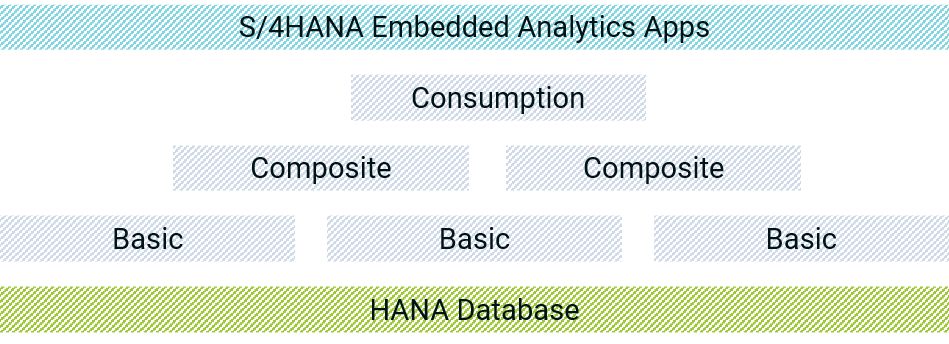
The Virtual Data Model is based on tables within the HANA database at its lowest level. Individual Basic Views are used to read data from the tables. In composite views, these data are brought into the desired relation to each other. Consumption views are used to make this combined data available for further use, such as S/4HANA Embedded Analytics Apps. With the S/4HANA Business Suite, SAP provides a wide range of standard views. Additional views can also be created based on views that have already been delivered. These extension views allow you to extend the delivered standard SAP content and adapt it to your individual needs.
It can take into account customer-specific fields and tables as well as specific logics with which you want to extend your operational reporting in order to optimally implement your customer requirements.
Standard content is extended in such a way that you retain all the benefits of the standard S/4HANA Embedded Analytics apps. To make views available for S/4HANA Embedded Analytics Apps, they must be created as analytical views.
The key user functionalities of S/4HANA Embedded Analytics
S/4HANA Embedded Analytics also opens up many new possibilities for your key users. Using standard tools, key users can now create new reports, fiori apps and dashboards for end users. This means that the reporting portfolio in your company can be specifically adapted. It is possible to browse all analytical and non-analytical
views through the View Browser and to view the structure and its table accesses. For analytical views the content, i.e. the result of the query, can be displayed. Key users can create their own reporting apps within the SAP Fiori Launchpad via smart business modeling apps. KPIs are the central entity of these apps.
KPIs can be created and analyzed using the following smart business modeling apps
- Create KPI
- Create evaluation
- Create tile
- Configure Drilldown
- Manage KPI links
- KPI Workspace
Frequently Asked Questions
Is Embedded Analytics subject to licensing?
No, it is an integral part of SAP S/4HANA and can be used there without any additional licenses.
What technical prerequisites apply?
Activating the embedded BW in SAP S/4HANA and the required Fiori apps is sufficient.
