Many companies are currently facing the challenge of replacing their existing SAP ECC systems. Support will end by 2030 at the latest — so it’s high time to start looking into the successor solutions. With SAP S/4HANA, SAP offers three variants that differ primarily in terms of operation, flexibility, and maintenance requirements.
Don't miss any more news
SAP S/4HANA Variants
On-Premise
The on-premises version corresponds to the traditional ERP product, in which the customer operates the software themselves on their own IT infrastructure. Customers can configure the system to meet their specific needs, have full access to the source code, and can supplement it with custom code. Responsibility for data, data backups, and software updates also lies entirely with the customer. Therefore, while the on-premise version of S/4HANA offers the greatest possible flexibility for customization, it also requires the most maintenance effort.
Private Cloud Edition
SAP S/4HANA Cloud Private Edition delivers a cloud experience with a feature set and upgrade flexibility comparable to that of SAP S/4HANA On-Premise. SAP releases a new software version annually and provides seven years of maintenance support for it. This offering safeguards previous investments, such as SAP ECC customisations or partner add-ons, thereby enabling customers to transition gradually to a pure SaaS environment.
SAP Cloud ERP (Public Cloud Edition)
With the SAP S/4HANA Cloud Public Edition, SAP takes care of system operation and maintenance. Customers do not need to invest in hardware and can immediately benefit from the latest innovations, which are released every month with minimal disruption to operations. Particularly in the finance and sales sectors, the Public Cloud is functionally equivalent to the Private Cloud or on-premises variants. Notably, new features are first rolled out in the Public Cloud and only subsequently made available for other deployment options.
Differences between public cloud and private cloud
The most pressing question for many businesses is: how do the two cloud variants actually differ? At first glance, they appear similar – in both cases, SAP licences the system in the cloud and it is operated either by SAP itself or by hyperscalers such as AWS or Azure. However, there are significant differences in the details that can be decisive when making a decision.
The Public Edition relies heavily on standards. Configuration and customisation are deliberately limited so that companies can get started as quickly as possible. Whilst extensions are possible – for example, via in-app or side-by-side extensions – they are not available to the same extent as in the Private Cloud. There are also clear limits when it comes to customisation: changes are made via the Central Business Configuration.
The Private Edition is closer to the traditional on-premises environment. Here, organisations have significantly more freedom: from extensibility and industry-specific content right through to extensive customisation options. This makes it possible to map even complex business processes that go beyond standard best practices.
One visible difference lies in the user interface. Whilst Private Cloud users can choose between traditional SAP GUI transactions and modern Fiori apps, Public Cloud users are restricted to the Fiori interface.

Similarities
As well as the differences, there are also areas of overlap between the two cloud systems. The following section therefore briefly explains these technical and functional similarities in more detail.
Technical similarities
Both the private cloud and the public cloud use SAP S/4HANA as their base platform. This means that best practices are available in both systems as predefined processes from SAP.
Another common feature is that they are delivered via the cloud. This means that companies do not need their own costly server infrastructure to provide their staff with access to the system. Instead, users can access SAP S/4HANA from any location. Consequently, both the private cloud and the public cloud offer a high degree of flexibility to their users.
Functional similarities
Thanks to the shared SAP S/4HANA platform, the core functions for finance are identical in both the private cloud and the public cloud. Accounts Payable and Accounts Receivable, the General Ledger and Asset Accounting are available to users in both versions.
Another common feature is the integrated standard processes, which are included in both the private cloud and the public cloud. This commonality is particularly evident in the chapter on accounts receivable processes.
Example processes
To illustrate this more clearly, the following section examines one process each from fixed asset accounting and accounts receivable accounting, based on SAP best practices, and analyses them in terms of their similarities and differences. The fixed asset accounting process is used to illustrate the differences, whilst the accounts receivable process serves to highlight the similarities.
asset accounting process

When it comes to asset accounting, the process differs between the public cloud and the private cloud. Take, for example, the retrospective capitalisation of assets. In the SAP Private Cloud, users have access to extended input options. Immediately after launching the app, for instance, a pop-up window prompts the user to enter the company code. In addition, an accounting policy, the asset class and a cost centre can be specified. It is also possible to enter a quantity – which significantly increases flexibility during data entry.
In the SAP Private Cloud, users have access to extended input options. For example, immediately after opening the app, a pop-up window prompts the user to select a company code. In addition, an accounting regulation, the asset class and a cost centre can be specified. It is also possible to enter a quantity – which significantly increases flexibility during data entry.
In the SAP Public Cloud, however, these additional fields are not available.
A common feature of both systems is that both the ledger and the valuation area can be selected. One key difference remains, however: only in the Private Cloud can the accounting regulation also be defined.
The two systems also differ slightly in their presentation. In the Private Cloud, the input fields are spread across several tabs and users can switch between the individual tabs. In the Public Cloud, all fields are available on a single page and can be accessed either by scrolling or by clicking on the relevant section.
One drawback of the Private Cloud is the navigation between the individual sections. In some cases, the next tab cannot be opened until all mandatory fields in the previous section have been completed. This can be perceived as disruptive to the user experience if users have become accustomed to a different order of entries.


In the SAP Public Cloud, however, these additional fields are not available.
What both systems have in common is that both the ledger and the valuation area can be selected. One key difference remains, however: only in the Private Cloud can the accounting standard also be defined.
The two systems also differ slightly in their layout. In the Private Cloud, the input fields are spread across several tabs and users can switch between the individual tabs. In the Public Cloud, all fields are available on a single page and can be accessed either by scrolling or by clicking on the relevant section.
One drawback of the Private Cloud is the navigation between the individual sections. In some cases, the next tab cannot be opened until all mandatory fields in the previous section have been completed. This can be perceived as disruptive to the user experience if users have become accustomed to a different order of entries.
Accounts receivable process
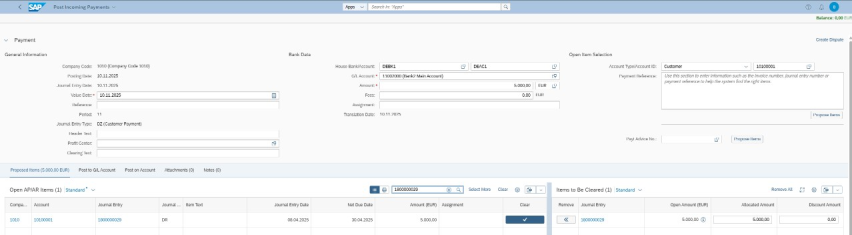
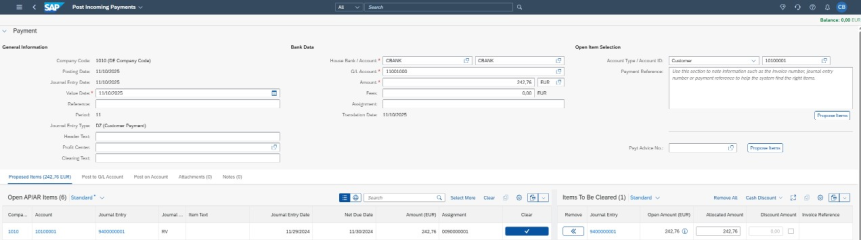
The accounts receivable and accounts payable processes share similarities between private and public clouds. Here is an example from the posting of incoming payments:

Unlike asset accounting, the user interface for posting incoming payments is structured almost identically in the SAP Public Cloud and the Private Cloud. Both the mandatory fields and their layout are identical in both systems. This has the advantage that, when switching from the Private Cloud to the Public Cloud, users do not need any additional time to familiarise themselves with new screens or changed field labels. The familiar interface ensures a high level of user acceptance and significantly reduces resistance and the need for subsequent training within accounts receivable.


Thanks to CONSILIO, we were able to establish a globally standardized controlling framework at our largest European locations and successfully harmonize our CO processes and master data.
Summary
It is particularly in finance that we see just how differently the two cloud variants can be used.
Processes such as accounts receivable are quite similar in both systems, whilst fixed asset accounting differs in certain process steps – not only in the design of the user interface, but also in the functionalities and restrictions when using the forms.
In general, it is also noticeable that whilst the public cloud offers significantly greater standardisation, the scope for customisation to meet a company’s individual needs is considerably more limited. As a result, by adopting the public cloud, the customer may lose some of the flexibility they are accustomed to with a private cloud solution.
For businesses, this means that the choice between a public and a private cloud should not be made solely from a technical perspective, but always within the context of their own financial processes, the flexibility required and their long-term business strategy.

In addition to the range of functions, ease of use, adaptability and business objectives are also key factors.